
Git Providers (GitHub / GitLab / Custom)
Two settings, two jobs
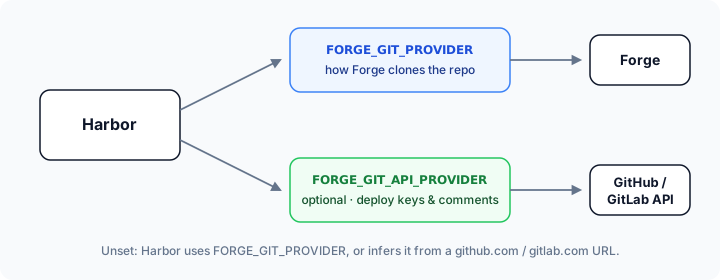
Harbor and Forge each talk to Git for a different reason:
| Setting | Who uses it | Job |
|---|---|---|
FORGE_GIT_PROVIDER |
Forge | How the preview site clones your repo |
FORGE_GIT_API_PROVIDER |
Harbor | Which Git API Harbor uses for deploy keys and PR/MR comments |
FORGE_GIT_PROVIDER is always set (default github).
FORGE_GIT_API_PROVIDER is optional. When unset, Harbor reuses FORGE_GIT_PROVIDER. For custom, Harbor infers the API from a github.com or gitlab.com FORGE_GIT_REPOSITORY_URL.
You only need FORGE_GIT_API_PROVIDER when those two jobs diverge and Harbor cannot infer it — typically custom pointing at a self-hosted host (for example [email protected]:…).
See also the configuration reference.
Which case am I?
| Your situation | FORGE_GIT_PROVIDER |
FORGE_GIT_API_PROVIDER |
|---|---|---|
| 1. GitHub, linked in Forge | github |
not needed |
| 2. GitLab.com, linked in Forge | gitlab |
not needed |
| 3. Self-hosted GitLab, linked in Forge | gitlab-custom |
not needed |
| 4. SSH clone URL, Harbor manages keys/comments | custom |
only for self-hosted hosts |
| 5. SSH clone URL, you add the key yourself | custom |
not needed |
| 6. Bitbucket | bitbucket |
not supported yet |
FORGE_GIT_REPOSITORY (owner/repo or group/project) is always required. Each case below lists the other env vars it needs.
Case 1 — GitHub (native)
Forge’s GitHub integration clones the repo. Harbor can reuse github for the API, so leave FORGE_GIT_API_PROVIDER unset.
FORGE_GIT_PROVIDER: github
FORGE_GIT_REPOSITORY: ${{ github.repository }}
FORGE_GIT_BRANCH: ${{ github.head_ref }}
Optional Harbor-managed deploy key (when Forge’s link is not enough):
FORGE_DEPLOY_KEY: true
GIT_TOKEN: ${{ secrets.GIT_TOKEN }} # permission to manage repository deploy keys
Optional PR comments: see Announcement Comments.
Case 2 — GitLab.com (native)
Same pattern as GitHub: one provider covers clone and API.
FORGE_GIT_PROVIDER: gitlab
FORGE_GIT_REPOSITORY: my-group/my-project
FORGE_GIT_BRANCH: ${{ github.head_ref }}
Optional:
FORGE_DEPLOY_KEY: true
GIT_TOKEN: ${{ secrets.GITLAB_TOKEN }} # PAT / project token with api scope
Case 3 — Self-hosted GitLab already linked in Forge
Use Forge’s gitlab-custom source-control connection. Harbor can treat that as the API provider too.
FORGE_GIT_PROVIDER: gitlab-custom
FORGE_GIT_REPOSITORY: my-group/my-project
FORGE_GIT_BRANCH: ${{ github.head_ref }}
If Harbor should register deploy keys or post MR comments against that instance:
FORGE_DEPLOY_KEY: true
GIT_TOKEN: ${{ secrets.GITLAB_TOKEN }}
GIT_API_URL: https://gitlab.example.com/api/v4
No FORGE_GIT_API_PROVIDER needed — it defaults to gitlab-custom.
Case 4 — Custom clone URL + Harbor Git API
This is the main reason FORGE_GIT_API_PROVIDER exists.
Forge clones with a full SSH URL (custom). For github.com and gitlab.com URLs Harbor infers the API automatically. For any other host, tell Harbor which API to use.
Self-hosted GitLab over SSH
FORGE_GIT_PROVIDER: custom
FORGE_GIT_REPOSITORY: my-group/my-project
FORGE_GIT_REPOSITORY_URL: [email protected]:my-group/my-project.git
FORGE_GIT_BRANCH: ${{ github.head_ref }}

# Harbor still talks to GitLab for deploy keys / MR comments:
FORGE_GIT_API_PROVIDER: gitlab
GIT_API_URL: https://gitlab.example.com/api/v4
GIT_TOKEN: ${{ secrets.GITLAB_TOKEN }}
FORGE_DEPLOY_KEY: true
GitHub repo, but you force a custom SSH clone URL
This is the pre-v2 “GitHub custom” setup. It keeps working without changes: Harbor infers github from the github.com URL.
FORGE_GIT_PROVIDER: custom
FORGE_GIT_REPOSITORY: my-org/my-repo
FORGE_GIT_REPOSITORY_URL: [email protected]:my-org/my-repo.git
FORGE_GIT_BRANCH: ${{ github.head_ref }}

GIT_TOKEN: ${{ secrets.GIT_TOKEN }} # must be allowed to manage deploy keys
FORGE_DEPLOY_KEY: true
When using a GitHub App token, the app needs Administration: Read & write on the repository to manage deploy keys; otherwise GitHub returns 403 Forbidden.
Case 5 — Custom clone URL + BYO deploy key
Forge still needs custom + FORGE_GIT_REPOSITORY_URL. You attach the deploy key yourself, so Harbor does not need a Git API.
FORGE_GIT_PROVIDER: custom
FORGE_GIT_REPOSITORY: my-group/my-project
FORGE_GIT_REPOSITORY_URL: [email protected]:my-group/my-project.git
FORGE_GIT_BRANCH: ${{ github.head_ref }}
FORGE_DEPLOY_KEY: true
FORGE_DEPLOY_KEY_PUBLIC: ${{ secrets.FORGE_DEPLOY_KEY_PUBLIC }}
FORGE_DEPLOY_KEY_PRIVATE: ${{ secrets.FORGE_DEPLOY_KEY_PRIVATE }}
Add the public key to the repo’s deploy keys before (or right after) the first provision. Leave FORGE_GIT_API_PROVIDER unset unless you also want Harbor to post comments (then set it + GIT_TOKEN as in case 4).
Case 6 — Bitbucket
FORGE_GIT_PROVIDER: bitbucket
FORGE_GIT_REPOSITORY: my-workspace/my-repo
FORGE_GIT_BRANCH: ${{ github.head_ref }}
Harbor does not manage Bitbucket deploy keys or comments via API yet. Rely on Forge’s Bitbucket link or server SSH access.
Deploy keys
How Harbor manages deploy keys
When FORGE_DEPLOY_KEY=true:
- Harbor generates an SSH keypair (or uses your BYO pair).
- If a supported Git API is configured (
github/gitlab/gitlab-customviaFORGE_GIT_PROVIDERorFORGE_GIT_API_PROVIDER) andGIT_TOKENis set, Harbor adds the public key to the repository. - Harbor creates the Forge site with
public_deploy_keyandprivate_deploy_key. - On teardown, Harbor removes the matching key from the provider.
FORGE_GITHUB_DEPLOY_KEY still works but is deprecated — prefer FORGE_DEPLOY_KEY.
BYO deploy keys
See case 5. If no API token is set, Harbor prints the public key and continues — you must add it yourself.
Troubleshooting
| Symptom | What to check |
|---|---|
Validation error about repository_url |
FORGE_GIT_PROVIDER=custom requires FORGE_GIT_REPOSITORY_URL |
| Site creates but clone / deploy fails | Deploy key on the repo, or Forge source-control link for that provider |
Native github / gitlab fails |
Connect the provider in Forge; confirm Forge can see the repo |
Deploy key / comments skipped on custom |
Self-hosted URL: set FORGE_GIT_API_PROVIDER to github or gitlab, plus GIT_TOKEN and GIT_API_URL |
403 Forbidden registering the GitHub deploy key |
GIT_TOKEN lacks deploy-key permission (GitHub App: Administration: Read & write) |
| Self-hosted API / deploy-key register fails | GIT_API_URL (include /api/v4 for GitLab) and token scopes |
| Comments not posted | GIT_COMMENT_ENABLED, GIT_TOKEN, GIT_ISSUE_NUMBER, and a supported API provider — see Announcement Comments |